


PDF files have become an indispensable part of everyday work. Quotes, invoices, contracts, forms—hardly any business process can do without them. At the same time, many of these files come from external sources.
This is precisely where a risk lies that is still underestimated in many companies. After all, PDF files are no longer merely static documents. They can contain complex structures, embedded scripts, interactive forms, automated actions, or external links. Each of these features can become a potential point of vulnerability.
In the age of AI, this problem is becoming acute: security vulnerabilities are being discovered more quickly, attack cycles are getting shorter—and traditional security measures are coming under increasing pressure.
A recent case illustrates the urgency of the issue
A recent security incident highlights just how critical this issue is: The vulnerability CVE-2026-34621, which Adobe has classified as critical, has already been actively exploited. Opening a tampered PDF file could allow attackers to execute code in the context of the logged-in user.
Such attacks are not an isolated occurrence. They follow a recurring pattern:
At first glance, a file may seem harmless, but it exploits vulnerabilities in local processing. What makes this particularly problematic is that the attack often occurs right where the document is opened—on the user’s device.
PDF applications such as Adobe Acrobat Reader receive regular security updates—often every few weeks. This is necessary and important. At the same time, it highlights a structural problem: security vulnerabilities are often not patched until after they have been discovered, analyzed, and an update released. In the meantime, there is a window of time during which systems may be vulnerable.
AI speeds up the search for vulnerabilities
Modern AI models are fundamentally changing the security landscape. On April 8, 2026, Anthropic unveiled its Claude Mythos Preview model as part of Project Glasswing. It was developed to identify vulnerabilities in software more quickly and systematically. According to Anthropic, the model has already found thousands of critical vulnerabilities, including in major operating systems and browsers. Project Glasswing is explicitly aimed at defensive security research and is made available only to a limited group of about 40 companies (Apple, Google, Microsoft, Cisco, Crowdstrike, and others) that develop or maintain critical software infrastructure.
For businesses, the implication is clear: the pace at which new vulnerabilities are discovered is accelerating. This also increases the pressure on traditional security processes, which rely primarily on detection, updates, and retroactive protection.

Why local PDF processing still poses a residual risk
Many companies rely on local PDF readers, antivirus scanners, endpoint protection, and sandboxing for PDF security. While these measures are important, they do not solve the underlying problem: the file is still processed on the end device.
Modern PDF files, in particular, can contain numerous features that are critical from a security perspective. These include, among others:
- Embedded JavaScript
- Automated actions
- Interactive forms
- External connections
- Outdated technologies such as XFA
- Complex rendering and parsing functions
Sandboxing mechanisms also have their limitations. While they attempt to execute potentially dangerous content in an isolated environment, the file is still opened, interpreted, and processed locally. This leaves a residual risk, especially when new vulnerabilities emerge or are discovered faster than they can be patched.
Our approach: Preventing risks from arising on the end device in the first place
CIB takes a different approach: Potentially risky documents are not processed locally on the user’s computer. Instead, rendering takes place in a secure server environment. The user sees only a formatted version of the document—similar to a secure snapshot. The original file is not actively processed on the end device.
This is exactly where our document viewer comes in CIB doXiview .
CIB doXiview – Secure and Efficient Document Processing
CIB doXiview moves the rendering of PDF and document content to a secure server environment. This reduces the risk of malicious content being executed or interpreted directly on the workstation.
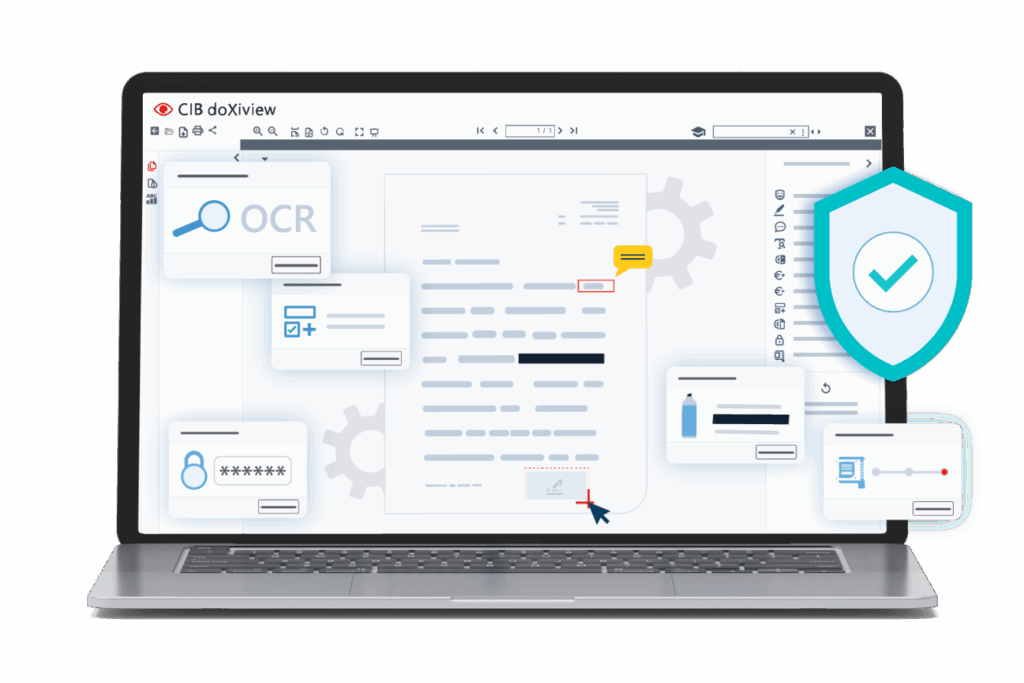
High-risk features such as JavaScript, XFA, or automatic external connections can be consistently blocked—in other words, precisely the mechanisms that are frequently exploited in attacks.
For users, the experience remains intuitive: PDFs can still be opened with a double-click, viewed, and integrated into standard workflows. Behind the scenes, however, the architecture ensures that risks are not only identified and managed, but systematically mitigated. Among other things, CIB doXiview helps companies with:
- Secure document viewing
- Server-side rendering
- AI-powered text recognition
- Automatic data anonymization
- Intelligent form processing
- E-invoice processing
- Digital signatures
- Fine-grained access control
- Secure deletion mechanisms
- Operated in compliance with European data protection standards
Our approach: Preventing risks from arising on the end device in the first place
Consulting Services
PDF files remain a central component of digital business processes. At the same time, their technical complexity and widespread use make them an attractive target for attacks.
As AI systems become increasingly powerful, the threat landscape continues to evolve. Vulnerabilities can be identified, analyzed, and potentially exploited more quickly. Traditional security measures remain important—but they should be supplemented by architectures that mitigate risks from the outset.

CIB doXiview addresses this very issue: Documents are not processed locally on the end device, but are rendered in a secure environment. This makes PDF processes more secure without compromising on user-friendliness or integration.
Rethinking PDF Security
If you’re looking to reassess PDF security in your organization, it’s worth exploring modern solutions such as CIB doXiview.
Try it and see how secure document viewing, digital signatures, e-invoices, AI-powered text recognition, and automatic data anonymization can be integrated into your existing processes.